User Management
User Management
User Management Overview
As an administrator, you have full control over your organization's users. This guide covers everything you need to know about managing team members.
Quick Navigation
- Inviting Users - Add new team members
- User Roles - Understand permissions
- Invite Codes - Self-service signup
- Managing Invitations - Track pending invites
- Deleting Users - Remove team members
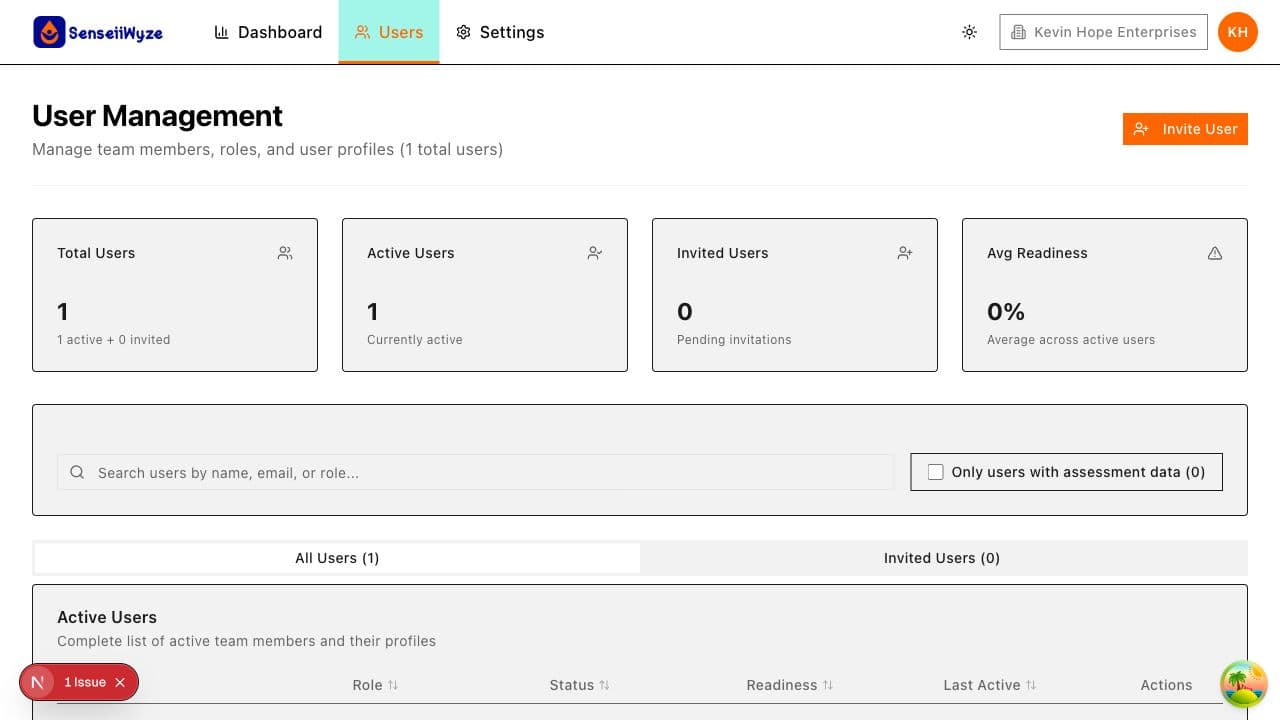
The Users Page
Access user management by clicking Users in the main navigation.
Active Users Tab
Shows all users who have accepted their invitation and are actively using SenseiiWyze:
- User profile (name, email, avatar)
- Role and department
- Last active date
- Quick actions (view, impersonate, delete)
Invited Users Tab
Shows pending invitations:
- Email address
- Assigned role
- Invitation status
- Date invited
- Actions (resend, cancel)
Key Concepts
Users vs. Seats
- Users: People in your organization
- Seats: Licenses on your subscription plan
Each user (active or invited) consumes one seat. Monitor your seat usage to avoid hitting limits.
User Status
| Status | Meaning |
|---|---|
| Active | User has accepted invitation and logged in |
| Invited | Invitation sent, awaiting acceptance |
Common Tasks
- Add a single user: Click "Invite Members" → Enter details
- Bulk import: Click "Invite Members" → Choose CSV or Excel
- Share invite code: Click "Invite Members" → Copy code
- Find a user: Use the search bar or filters
- View user details: Click on a user's name
Who Can Manage Users?
| Action | Admin-Executive | Admin-Manager | Member |
|---|---|---|---|
| View all users | Yes | Yes | Limited |
| Invite users | Yes | Yes | No |
| Delete users | Yes | Yes | No |
| Change roles | Yes | Limited | No |
| Access billing | Yes | No | No |
Tips for Effective User Management
- Assign appropriate roles - Give users only the access they need
- Monitor seat usage - Stay within your plan limits
- Follow up on invitations - Resend to users who haven't accepted
- Keep data clean - Remove inactive users to free seats
- Use invite codes wisely - Regenerate if code is compromised
Need Help?
If you're having trouble managing users:
- Check our Troubleshooting Guide
- Contact support at support@senseiiwyze.com